


Everyone talks about ROI. This marketing campaign is set up to measure it.


This tutorial walks you through each step for an evergreen marketing campaign to promote your services. The tutorial starts with the end — a form where your prospective customer submits a lead to sales. It ends by dissecting the ROI. So, you can make changes and improve the assets over time.
In This Article
- Create Landing Pages Based on Your Services
- Build “Thank You” Pages
- Set Up Advertising to Start Your Conversion Funnel
- Nurture Leads Until They Convert
- Track and Improve Your Campaign Over Time
- Get Started Today
Purpose: Create a marketing campaign to promote your business services all year long.
Digital marketing campaigns are the perfect format to generate leads for a service business. The link between audience and content is natural! Just start by describing what you do and find the people who are looking for the same thing.
My Marketing Principles
- Grow your campaign slowly over time. Start with small dollar amounts and a little bit of intuitive insight. Then, let the data inform your next steps.
- Put yourself in the customer’s mindset. Don’t sell hard! Simply position yourself as a trustworthy guide through the consumer decision-making process.
- Think of promotion as a dialogue with a lot of opportunities for you to listen. User behavior is the way your customer talks back to you as you try to sell them on your services. Pay attention to what they do as they move about your conversion funnel.
So, this strategy is simple. Build a marketing campaign around obvious behavior and tweak it until it performs perfectly.
Defining the Terms
Throughout this article, I will be using several marketing terms.
- The term “marketing campaign” can be a bit confusing because (in a granular sense) each platform allows you to run a “campaign” — placing an ad or group of ads. In the larger sense, a marketing campaign is a bundle of activities focused on a goal. So you can have little “campaigns” on platforms inside one big campaign.
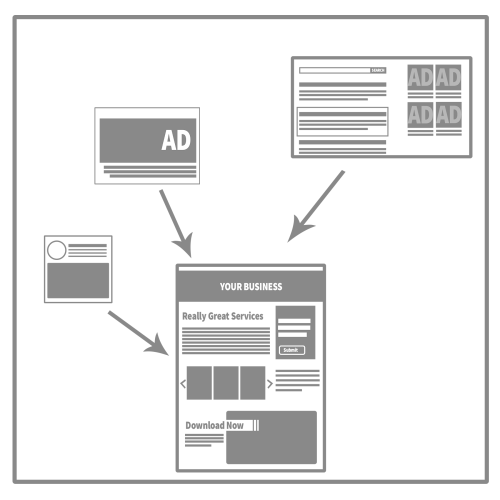
- The Landing Page is where the website visitor first hits your website after clicking through from another source. In this campaign, you are creating a separate landing page for each of your business services. Your website traffic will be clicking on pay-per-click ads on search (Google Adwords) and social media platforms (Facebook and Linked In).
- A Conversion occurs when someone fills out the form on your service page. The form is asking them to contact a sales rep at your business.
- The Conversion Funnel is the path a user takes from seeing your ad to actually filling out the form on the landing page.
- This marketing campaign uses Pay-per-click (PPC) ads to push traffic to your landing page. You will pay for a mix of impressions (ad views) and clicks on the ad.
- Calculate a Click-Through-Rate (CTR) by dividing the number of clicks by the number of impressions.
- The Call to Action (CTA) represents whatever you want your prospective customer to do. In this example, we have two call-to-actions. The primary CTA is that we want them to fill out the form which will email a sales rep. The secondary CTA focuses on prospective customers that are not ready for a high-commitment interaction.
- Your business may be business-to-business (B2B) or business-to-consumer (B2C). A B2B customer is where your services are used by another company. A B2C customer is a person who hires your services for their personal use. Throughout this tutorial, I make distinctions when applicable.
- You qualify leads to determine how likely they are to become an actual customer. This can be a formal scoring system or just a shorthand between sales reps.
- The Sales Funnel starts when marketing hands off a lead to a sales rep. However, a feedback loop between sales and marketing benefits everyone.

Create Landing Pages Based on Your Services (Step 1)
On your website, you probably already list your services. For this project, you are breaking them out into separate pages — one page for each service.
On Each Page
- Write excellent text describing your service. Use common phrases that people may search based on their needs or problems.
- Place wonderful photos of your team working. Avoid stock photos!
- Include helpful links, documents, and media related to the topic. Only use your own or ones from credible sources.
Use a similar format for each page for consistency.
Laying Out Service Landing Page Content

From top to bottom, your content should go from broad to narrow. The headline and subhead should clearly state your service with relevant details. The body copy should focus on the customer’s needs.
The form should sit “above the fold” on both desktop and mobile. Anything below the form and main content should support the main CTA of filling out the form.
Setting Up the Form
Each of your landing pages needs a separate form. You can use one of the forms that come with your website or you can install a third-party form. Explore the options and style to match your page.
Form Fields
- First Name *
- Last Name *
- Email Address *
- *required feilds
Note: If this is B2B, you may want to add fields for “Company Name” and “Job Title.”
PRO TIP: Use as few fields as you can. This increases conversions. You can qualify leads later in the sales funnel.
Key Settings
- An Auto-Response Email or Confirmation triggers as soon as someone fills out the form. Choose to redirect this to another page (see Step 2).
- The notification should go to the sales rep who will be handling the lead.
Creating a 15 Minute Sales Email

After someone fills out the form, they should get a sales email with key information about their request. It should prepare them to get a phone call and keep them “warm.” It can include contact information for their sales rep, in case they just can’t wait for a call.
Ideally, this is a generous email, containing something of value to the customer to reward them for filling out the form.
Generosity Examples
- A coupon or discount just for contacting you
- FAQ answers based on their stage of the process
- A free gift, branded with your logo
Overall, you want to associate your brand with warm, fuzzy feelings of appreciation. They gave you their email address!
Scheduling 30 Minute Sales Phone Call
Since you set up a notification email, you want to put in place a plan for a sales call. You just promised that someone would be in touch shortly. Ideally, the sales rep will call the lead within 30 minutes of form completion.
PRO TIP: Do not engage in “spammy” behavior of any kind. After the first email and phone call, take the time to qualify your leads. If you dump them into a thoughtless automation, you’ll ruin your credibility as a brand.
Each day that you wait, the lead grows cold and they look for other options.
You can automate a link between the email notification and the sales rep’s task management system. Or you can simply educate the sales rep to look for email alerts as they come through. Regardless, make this a priority for the sales funnel.
Adding a Lower-Commitment CTA
There is a large chance that someone won’t be ready to talk to a sales person. So, I prefer to add a lower-commitment CTA on the page. It’s secondary and shouldn’t distract from the main CTA.
Instead, it’s a way to keep your prospective customer on the page longer and maybe get them to click a little deeper into your website.
Low Commitment CTA Examples
- An Article or Blog Post
- A free eBook
- A Tutorial
- A FAQ
- A Free Download
Flex your creativity on these to make something useful and engaging. Consider where your customer may be in their search for information.
Again, these are not hard sale-driven at all. They’re focused on creating a valuable experience for the user.
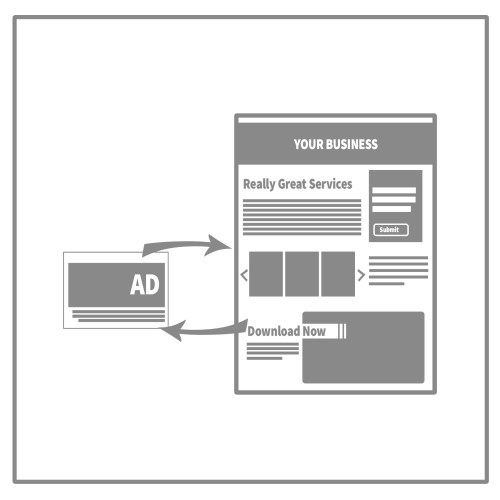
Above all, connect this CTA back to your original landing page. They may just need a little more time to loop back to contacting a sales rep.

Build “Thank You” Pages (Step 2)

After someone fills out your form, they will be redirected to a “Thank You” page. It should thank them for submitting the form and encourage them to stick around on the website.
Below that key message, fill the page with valuable information. It can keep them “warm” for the upcoming email and phone call.
Valuable Information Examples
- Videos
- FAQs
- Blog Content or Articles
Ideally, they stay on the page for some time and click around. This is good for both your website’s reputation metrics (related SEO) and the customer’s experience.
Additionally, this page gives you an easier way to track conversions (set up in Step 3 and reporting in Step 4).
Set Up Advertising to Start Your Conversion Funnel (Step 3)
Although your pages may get some traffic from organic sources, promotion will generate that traffic faster. As you place the ads, try to use a niche approach to marketing. Essentially, you’ll advertise to a lower amount of people who are more likely to be interested in your services.
Important Considerations
- Aiming to retain converters keeps the focus on the whole funnel, instead of just generating a lot of clicks or impressions. So, you shouldn’t cast a wide net. Focus geographically, demographically and by interest.
- Increase on-page time by clearly previewing the landing page content. It shouldn’t be a bait-and-switch. Your ads should match what follows when they click through.
If this is your first time setting up any of these ads, you may struggle to find your audience at first. Start with a low amount. Then, increase the amount on everything that performs well.
Google Adwords

To set up your google adwords promotion, start by creating a separate AdWords campaign for each service. It should link to the appropriate landing page. Use keywords from your page to guide your ads, grouping them as needed.
Follow the steps that Google lays out in their tutorial.
Key Settings
- Do Adwords only, not display
- Choose “Leads” as your campaign type
- Make sure your ad extensions are correct
- Make sure you calculate your daily budget carefully with an “end date” for the end of the month.
Regardless of your keyword strategy, focus on the experience of your prospective customer. In general, I’ve found that the content on the landing page is the best place to start.
- Any relevant industry terms, certifications, laws, or regulations can be added as keywords. Just make sure you used them on your landing page so that people find the information they expect.
- Generate phrases that reflect your prospective customer’s needs
- Don’t just let the “sandbox” generate results without checking them. Even if they have a “high” search volume, they may not be relevant.
Once your Adwords are running, you can watch them closely (see Step 4). You can remove low-performing keywords and add more variations of the ones that perform well.
LinkedIn Ads
For B2B, LinkedIn offers Text ads that are a similar format to other PPC ads. They allow you to choose details based on the user’s profession like their industry or job title. Create separate ads for each of your services, linking them to the related landing pages.
PRO TIP: If you don’t have a robust LinkedIn following, their text ads give you the reach you’re lacking from organic posts.
In general, I’ve found these ads have low impressions and clicks but, a higher-than-average conversion rate. The volume isn’t there but, LinkedIn is good for finding a niche audience.
Facebook Ads

Creating a promotional Facebook ad works well for small businesses that want to target according to geography. You must have a personal Facebook account and a linked Facebook Business page to place Facebook ads.
PRO TIP: People can only see your organic posts if they follow your business page. If you want to expand your reach to new customers, you’ll need to pay for sponsored placement.
Start by creating a separate ad for each service type and make your landing page the destination URL.
Best Practices
- Allow the campaign to make connections with your followers and “their friends.” This is a good “trust-building” setting.
- Remember that the ads will push to the entire network (including Instagram). Check the format on your ads for each placement type. It’s available in the preview.
- Make sure you capture the “Pixel” and add it to your landing pages for each campaign.
Your objective should be “Website Traffic.” Also, you can set a daily budget or a total budget. Like above, focus the content, audience, and placement to your niche audience and keep it relatively small. That will make your CTR higher over time.
Your Ad Budget
To determine your spending for each platform, start by calculating 5% of your total business budget. Divide that between the mediums. Then, divide that by the number of days in the month. This should give you an idea of what you should spend on your daily PPC budget.
Guidelines from U.S. Small Business Administration
- Small Business Trends reports that the average business spends 1.08% of its revenues on advertising, with variations from industry to industry.
- Web Strategies reports average marketing spending in 2018 was 7.9% of revenues, with B2B product companies spending 6.3%, B2B services companies spending 6.9%.
- B2C companies spent slightly more on average, with product companies spending 9.6% and B2C services companies spending 11.8%.
Also, make sure you’re comfortable managing the amount that you’re spending. With digital ads, it’s easy to start them and forget the credit card charges. You’ll get the most value if you can monitor and adjust them as they run. You may need to spend a smaller amount at first to make sure you can watch evaluate the traffic.
Nurture Leads Until They Convert (Step 4)
Retargeting Ads
There are several services that offer retargeting ads. Set them up by service type, redirecting back to the original landing page. Each type has its own services but, Adroll and Perfect Audience are both popular and intuitive.
Personally, I would recommend Perfect Audience for this marketing campaign based on the way it handles cookies and Facebook retargeting.

Track and Improve Your Campaign Over Time (Step 5)
Google Adwords Reporting
When you log into Google Adwords, there are a few key areas you should check. First, go through each campaign and check the keywords.
- Remove any keywords that are getting no clicks.
- Check keywords with a high cost-per-click.
- Note keywords that have a high-click through rate.
Keep these notes for when you go into Google Analytics, below.
LinkedIn Analytics
When you review your LinkedIn ad performance, note impressions, clicks, and engagement. Keep track of which ones have the most clicks through to your landing page. Hold onto those notes for when you go into Google Analytics, below.
Facebook Analytics
Similarly, check your Facebook display ads for performance including impressions, clicks, and engagement. Hold onto those notes for when you go into Google Analytics, below.
Form Conversions
Inside your website, you can see your form conversions. They’re in a different area depending on the type of website. Check this regularly, especially at the beginning, to make sure the notifications for the sales reps are working. (They often go to spam folders.)
Google Analytics
Many people like to create a one-stop dashboard in Google Analytics (or another dashboard that draws from analytics) to track their goals. I prefer to review from both the ad platforms and Google Analytics because it makes me think about the marketing campaign in different ways.
Look Up Your Service Landing Pages
In this review, you can see the traffic for each page and the source of that traffic.
- Go to Behavior -> Behavior Flow -> Site Content -> All Pages.
- Select one of your service landing pages.
- Select “Secondary Dimension,” and go to Behavior -> Full Referrer
- There you will see traffic sources, including the ones you’re paying for.
- Use this to evaluate all of your Service landing pages.
Also, you want to see how the pages are performing overall
- Go to Behavior -> Site Content -> All Pages and select the service page
- You can see the stats for that page, taking note of Page time and Bounce Rate
Look at your Google Ads
- Go to -> Aquisition -> Google Ads
- In this you can individually look up keywords, comparing clicks, bounce rate and on-page time.
After your ads have run for a little while, you can set up the “Goals” under conversions. Although there are advanced and complicated ways to set it up, a few features are useful for anyone.
Look at your LinkedIn Ads
- Go to Acquisition -> Social and look at “Overview” and “Landing Pages”
- You can filter to see the LinkedIn traffic.
- Also, you can set up “goals” under conversions, using your “Thank You” pages.
Look at your Facebook Ads
- Go to Acquisition -> Social and look at “Overview” and “Landing Pages”
- You can filter to see the Facebook traffic.
- Also, you can set up “goals” under conversions, using your “Thank You” pages.
Set up Google Goals
- Go to Conversions -> Goals and choose to “Set Up a Goal”
- Set up a different goal for each service.
- Follow these steps from Google, using your “Thank You” pages URLs. It’s a “Custom” goal option.
- Verify the goal and make sure it starts recording.
Set Up Your Dashboard
Inside Google, you can add anything to your dashboard by filtering data.
- Create a new Dashboard and select Blank Canvas, or click + Add Widget on an existing Dashboard to open the widget editor.
- Select the type of widget.
- Configure the widget’s dimensions, metrics, and other options. These vary depending on the type of widget. Scroll or use the search box to locate the specific metric or dimension you want.
- You can limit the data shown by the widget by clicking Add a filter. Filters let you include or exclude data in the specified dimension that matches your filter criteria. You can add multiple rows to your filter definition. All conditions must be met for the filter to work. Report and Dashboard filters are not the same as view filters. View filters permanently change your data, while report and Dashboard filters only limit the data displayed in the report or Dashboard. Dashboard filters are specific to the Dashboard in which you define them.
- You can link the widget to a report or a URL. Doing so makes the widget title a link, taking you to the specified report or web page. To link to a report, begin typing a report name. Analytics will autocomplete your entry, trying to match it to an existing report. Alternatively, you can copy and paste the report’s URL into this field.
- Enter a Widget Title or accept the suggested title.
- Click Save.
As you track your goals and learn to filter each setting, you can create a dashboard focused on your specific needs.
Sales Meeting
Internally, this data has even more value when you connect it with your sales funnel. Bring it to the sales meeting and talk with your reps about the leads they are nurturing. You can manually track each lead by name during this discussion.
(Later, you may use an automated system to link and track the leads that came from this marketing campaign.)
Take note of which leads are still engaged, which ones dropped, and which moved onto a sale. Also, the questions that come up during the sales call can help you improve your landing page content and may even provide insights for your ads (messaging, keywords, audience, etc.)
How to Calculate Your ROI

Thinking about your funnel, you can calculate your ROI easily. First, you need to know the number of sales that came from your marketing campaign and the value of those sales. Your sales team should be able to provide this for the month, week or quarter.
For the same time period, you can pull the amount of money you spent on ads and the number of hours you spent deploying this campaign. Add those dollar amounts together.
Then, you just need to divide the value of those sales by the total amount you invested in the campaign. Multiply by 100 and you have your ROI.
Additional Key Metrics
- Cost Per Click is the amount you paid for each click on each channel. You can find this easily in the standard reports for each of the platforms above. This varies by industry but, see what you can do to lower your CPC over time. See if you can keep it at $0.80 or less.
- Click-Through Rate divides the impressions by clicks. You want this number to get higher over time. If you get 1% that is a good starting point (2% is above average for most channels).
- Conversion Rate is the number of people that fill out your form divided by the number of people that visit the page. You can pull this quickly by dividing the Unique Page Views by the number of Form Entries. See if you can get 0.1%. This can be hard at first because it’s the biggest “ask” in the process.

Get Started Today (Step 6)
If you already have a website, especially one with services listed, part of your work is already done. You just need to expand that content and build it out into separate landing pages. From there, you can use this simple marketing campaign to drive traffic to the pages.
Then, as traffic comes to your landing pages, you can make adjustments and improve your campaign over time. With this process, you can build a stream of leads for your sales flow.
Additional Tips
- From a search engine optimization perspective (SEO) these service pages can become a gold mine. Make sure they are optimized correctly and that the content is written for the benefit of the reader, prioritizing searcher task accomplishment.
- Don’t forget to clarify geography. If your services are locally based, make sure your service area is clear at every level of your marketing campaign.
- Check your competitors to look for areas of opportunity and potential challenges. Researching their online activity can give you insight for your own strategy.
If you’d like assistance putting together a service-focused campaign, get in touch with me. I can build an evergreen campaign that will promote your services to prospective customers all year long. Then, you can let the campaign run with occasional adjustments and optimization.
If you enjoyed this post, please review the additional information below. Also, you can stay up-to-date on digital media advice and free marketing resources by following me on Instagram or Facebook.
Additional Reading
- The Metric Startups Can’t Ignore from Inc.
- How much should you budget for marketing in 2019? by Web Strategies
- Improve Your Local Ranking on Google by Google
- How to Map Your IMC Timleine by Danielle Verderame
- 4 Weak Marketing Offers You See Everywhere… and What to Make Instead by Danielle Verderame
More Like This
- Want to Improve Your Email Marketing Open Rate? Try This.
- How to integrate proofing into your creative process
- How to publish 3 case studies in 3 weeks
- Should you launch and enewsletter? A self-guided quiz
- When are eBlasts worth your time?
- How to use tutorials to attract new business
- 5 Marketing Initiatives that Benefit from Blogging